Page 1 of 1
Need text compare program suggestions
Posted: Mon Mar 04, 2013 9:54 am
by ozstar
Hi,
I have MyInfo in Dropbox and keep getting 'Conflicted copies' whci now load when we streat MyInfo.
So there are now 2 data files and some data ends up in each. I need to get all the data back into just one file.
To do this I will need to see what pages have been created or changed in each file.
I assumed a text compare program would be okay however it seems the text in MyInfo is in code so that is all I got when I put both files into it.
Anyone know what program may help me compare my .mio files.
Thanks
oz
Re: Need text compare program suggestions
Posted: Mon Mar 04, 2013 11:08 pm
by ozstar
I tried to use WinMerge however the data shewed up as code not text.
Any help here please?
oz
Re: Need text compare program suggestions
Posted: Fri Mar 08, 2013 8:39 pm
by Petko
MyInfo uses Zip Archive files (but with changed file extension) for storing its data. Although there are programs that can compare such files, I do not advice you to rely on such, because the topic structure and document files in the archive are binary, so you end up seeing "code" again..
Re: Need text compare program suggestions
Posted: Fri Mar 08, 2013 9:38 pm
by ozstar
Okay so that explains that and I understand what uou are saying.
If you had two or 3 versions of the same mio file how would you find out which 'pages' are in one or two but not the other. I could get it if I had a date on each page every time we make an new page or change a page.
There has to be a way without having tp trawl through a few thousand pages one by one.
Thanks for the reply.
oz
Re: Need text compare program suggestions
Posted: Sat Mar 09, 2013 11:17 am
by Petko
MyInfo already has this information. It is stored in the Modified At attribute for each document.
The easiest way to quickly see which are the recently modified documents in a topic is to create a "Recently Modified" filter:
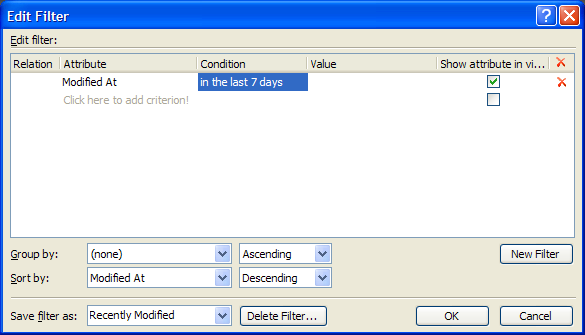
If you want to see all documents, instead of just documents modified in the last 7 days, just modify All Documents filter by adding the sort by Modified At.
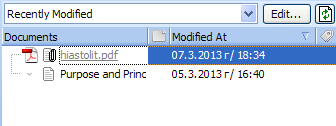
Then you will see a list of recently modified documents, sorted from the most recently modified to the oldest:
Re: Need text compare program suggestions
Posted: Tue Mar 12, 2013 2:36 pm
by Coolrat
Thanks for posting this!
I used your instructions to create a "Modified in last 7 days" and "Created in last 7 days" filter.
This is very useful indeed!
Re: Need text compare program suggestions
Posted: Wed Mar 13, 2013 9:39 am
by ozstar
Hi,
Haven't had time to try it yet but this looks like what I need.
Thanks
oz