I found out by chance in which situation the described behaviour occurs (in my case):
When the option "
Close button miminizes application" (under Tools ---> Options ---> General) is
checked.
When this option is
unchecked, MyInfo opens maximized in case that it was closed maximized. (I did not test the behaviour with other window sizes too.)
___________________________________________
I discovered it while I tried to find the reason for another strange behaviour concerning the window of MyInfo which occurred just now for the first time. I will describe it in this thread because perhaps the issues can be explored together.
When the window of MyInfo is opened (always maximized) and I click on the minimze button (in the upper right corner) the window - since today (or yesterday) - disappears from the (left side of) the task bar (only the symbol in the tray on the right side remains).
I mean this minimze button:

And this is the (missing now) minimized window in the taskbar (on its left side):
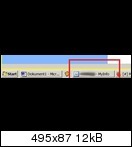
Orginally all worked fine again after a reboot of Windows but after a short time the disappearing occurred again. So I made another reboot of Windows and now the minimized window is lost from the taskbar already from the beginning, that means from the first time I clicked on the minimize symbol.
These are my minimizing options under Tools ---> Options ---> General (which I did not change during all the months):
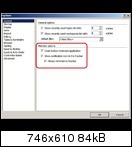
---> All three options are checked.
When I uncheck the option "Always minimize to traybar" the minimizing works (again) as it should. But this cannot be a satisfying solution beause in this case the minimized window stays in the task bar (left side) too when I (try to)
close the window (by clicking the X in the upper right corner). But in this case of course the desired behaviour would be that the minimized window indeed disappears from the left side of the task bar.

Theoretically I can only imagine the following reason for the recent wrong behaviour:
Usually when using MyInfo I also have opened (only) MS Word and the browser (with all opened windows visible minimized in the task bar). During the last days often I open additionally another program, a text and code editor called PSPad (
http://www.pspad.com/en/). When I realized the disappearing of the minimized window for the first time, PSPad was open too. Could it be possible that one program influences the behaviour of the windows of another program? But it seems very unlikely to me because now the issue occurs even after the mentioned reboot of Windows and
without having started again PSPad.
If it is of importance:
I use PSPad (version 4.5.6) with its default settings for the behaviour of the windows. But there is one modification: About 2 or 3 days ago I chose an option that PSPad remains in the tray after clicking the close button of the window (like the same option in MyInfo). In PSPad you can choose it in Settings ---> Program Settings ---> System integration ---> checking "
Minimize to Tray Icon on Exit":
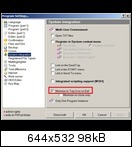
I can hardly imagine that there is a connection. But it is strange that the issue with MyInfo appears just now, after many months without any problems with minimizing.

 ). Just wanted to mention it in case that it can help to clarify the matter.


